Part I : Understanding Agentic Workflow, its building blocks, and protocols
At a Glance !!
Contrary to what some might believe, creating your own agents and running your own MCP server doesn't require expert-level knowledge of a programming language; it's simpler than you might think!
This first part provides foundational level information on Agentic AI and its architecture. If you already are well versed in this area, then skip over to the second part. Here, you will get a crisp understanding of the core concepts behind Agentic AI, and get your terminologies sorted out. Once the "What" is sorted out, the subsequent blog will focus on the "How" and walk you through creating all of these entities.
From LLM to Agentic Workflow
The terms "Agents" and "Agentic Workflow" are often thrown around these days - often without even fully understanding what they really mean. It's becoming a normal practice to call an automated workflow "Agentic", while the workflow doesn't involve the key ingredients of an Agentic workflow, sometimes not even an LLM.
An Agentic workflow requires the following three pieces as its building-blocks:
- A language model, typically LLM, ideally one that has some level of training or has been exposed to some context of the type of tasks you would normally run. However, for all practical purposes, a foundational model that supports tool calling is sufficient. (Note: not all foundational models support tool calling, though most advanced ones, such as Gemma4 or Granite4.1, have this capability. You can see an example list here)
- A piece of code that can execute a task. The task this piece of code, referred to as Tool, can be as simple as writing a file, performing a web search, calling an API, performing simple addition; anything that can be thought of as a "task".
- An interface, which can be another program - perhaps coupled with a fancy GUI as user interface - that can "talk" to both the LLM and the "Tool". This program is what we can refer to as an Agent
Collectively, these three can provide the ecosystem where tool can be called, results can be analyzed by LLM, next instrucutions provided, and hence a complete cycle of events that, after possibly repeating a few times, completes the provided task. This is what is correctly classified as Agentic workflow.
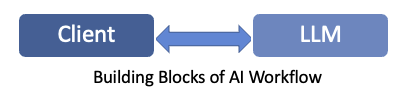
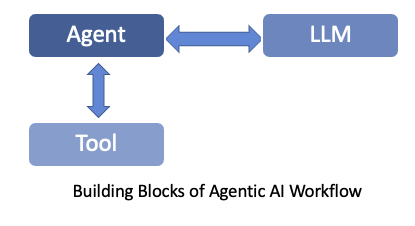
The role of the Agent is to define the task. This may be through a user query, or some instructions that are coded into it to be executed when it runs. But its role is to utilize the LLM and Tool(s) to get this task done. The Agent initially connects with the Tool (rather, the program that is providing the tool's functionality) and learns about the tools available to it and what those tools can do. Contrary to what you may be thinking, this is not done in some magical or smart way. Its the Tool creator's job to define what a tool is capable of doing, and properly embed this information in the tool definition. The Agent simply relies on that embedded information to determine the tool's capabilities. It then takes the query to the LLM, in the form of a prompt, and additionally adds the information to let the LLM know about the tool that the agent has access to. The LLM now uses inference to determine a response to the prompt. It also knows that if any of the responses require actions that the available tools can perform.
To better understand this, take the example of an Agent that is tasked with searching of local files and providing a table that has a one line summary of each of the files. The Agent has been provided access to a Tool that can run simple commands on the shell, including listing file names and reading their content. The Agentic workflow will look like the following:
- The Agent will initially contact the LLM (which may be anywhere, even a remote LLM accessible over the internet - i.e. the LLM doesn't have any visibility into the local filesystem). The Agent will provide the LLM the task it has been asked to achieve, and the list of Tools available to the Agent.
- The LLM will determine the commands that can be used to read the file system to get filenames, and then also to read the contents of the files. In a typical AI workflow, the LLM would have simply provided these instructions to its client, and that would have been the end of it. But Agentic workflow gets the job done using Tools.
- The LLM will let the Agent know about the next steps, and the Agent will decide to use the Tool to run the command for getting file names, and provide that list back to the LLM.
- The LLM will parse through the list, make an initial table in its memory (i.e. its "context window"), and then ask the Agent to read the comments of each file (once more, using the Tool available to the Agent) and provide that content back to the LLM. Depending on the LLM, it may break down this request to the Agent in multiple queries, one file at a time, or just give it a list of filenames and the commands (or small script) to run that would gather contents of all the files.
- Once the LLM has data for all the files, it can summarize them one by one and populate that table. Eventually, it will present the completed table to the Agent.
- The Agent will present this table to the querier
Protocols in Agentic Workflow
Since the Agent has the responsibility to talk to both the LLM and the Tool, it must use a well established protocol to communicate with them. Let's talk about those:
Between Agent and Tools - Model Context Protocol (MCP)
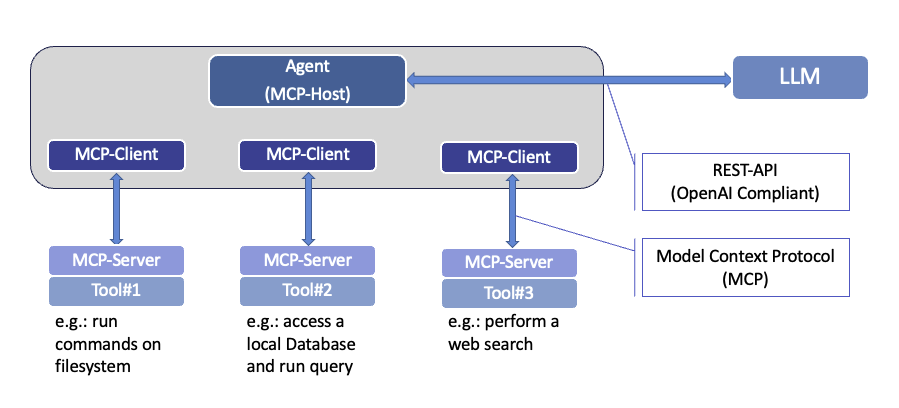
In the initial days of Tools availability, there wasn't any standard for communication between Agent and the application offering Tools. Towards the end of 2024, Anthropic introduced an open standard for communication between Agent and Tools, and called it Model Context Protocol (MCP). This standard got picked up by others as well, and quickly became the default standard that all Tool and Agent developers would use.
In the MCP terminology, the application offering the Tool acts as an MCP Server. That makes the Agent application an MCP Client. The MCP-Client (i.e. the Agent) uses Model Context Protocol to query the MCP-Server about the tools it has avaialble, and what those tools can do. The MCP-Server in response provides the list of tools it has available. Additionall,y it can provide resource information (such as list of filenames, or contents of files - to match our earlier example), and prompts for user selected templates. Initially, MCP didn't offer authentication or encryption of the communication. However, those have been addressed in more recent updates through the use of HTTPS and OAuth as options. Those details will be covered in a separate future blog on MCP and its details. For now, however, its sufficient to know that the MCP Server offers access to and details of the Tools.
The transport layer of the MCP protocol defines two options for connectivity and data transfer. Namely, STDIO and Streamable HTTP. The former uses standard input/output methods when interacting with the MCP-Server, while the latter allows for use of HTTP POST requests for messaging between the MCP Client and Server. In the case of STDIO, the MCP-Client and MCP-Server obviously have to be co-located - but it offers a faster and more efficient response time since there isn't any network involved between their communication. On the other hand, Streamable HTTP allows for Client and Server to be located at different locations with IP connectivity between them.
Between Agent and LLM - REST API
The Agent and LLM communicate simply using REST API. Though there isn't a standard defined for this, the conventional practice and popular approach is to stick to the OpenAI defined set of REST API calls for interaction with its LLM. A very simple example of that is querying a locally running LLM run time to see which models it has available, like in the example below:
curl -s http://127.0.0.1:11434/v1/models | jq
{
  "object": "list",
  "data": [
    {
      "id": "gemma4:latest",
      "object": "model",
      "created": 1781285999,
      "owned_by": "library"
    },
    {
      "id": "ibm/granite3.3-vision:2b",
      "object": "model",
      "created": 1763441463,
      "owned_by": "ibm"
    },
}
Another example is the following that gets a responsea from an LLM using REST API call:
curl -s http://127.0.0.1:11434/v1/responses -d '{ "model": "gemma4:latest" , "input": "Hello!" }' | jq
{
  "id": "resp_277865",
  "object": "response",
  "created_at": 1794416778,
  "completed_at": 1794416778,
  "status": "completed",
  "incomplete_details": null,
  "model": "gemma4:latest",
  "previous_response_id": null,
  "instructions": null,
  "output": [
    {
      "id": "rs_resp_277865",
      "type": "reasoning",
      "summary": [
        {
          "type": "summary_text",
          "text": "Thinking Process:\n\n1.  **Analyze the input:** The user said \"Hello!\". This is a common, friendly, and conversational opener.\n2.  **Determine the user's intent:** The user is initiating a chat and looking for a friendly acknowledgment.\n3.  **Determine the goal:** Respond in a way that is:\n    *   Friendly and welcoming.\n    *   Engaging (to encourage further conversation).\n    *   Neutral (since no topic was provided).\n4.  **Formulate responses:**\n    *   *Simple acknowledgment:* \"Hello!\" (Too brief)\n    *   *Welcoming acknowledgment:* \"Hello! How can I help you today?\" (Standard and effective)\n    *   *More conversational:* \"Hello! How are you doing? What's on your mind?\" (Warmer, encourages chattiness)\n5.  **Select the best option:** A combination of welcoming and guiding is usually optimal.\n\n*Self-Correction/Refinement:* I should make sure the tone is helpful and positive.\n\n6.  **Final Output generation:** (Resulting in a friendly and open response.)"
        }
      ],
      "encrypted_content": "Thinking Process:\n\n1.  **Analyze the input:** The user said \"Hello!\". This is a common, friendly, and conversational opener.\n2.  **Determine the user's intent:** The user is initiating a chat and looking for a friendly acknowledgment.\n3.  **Determine the goal:** Respond in a way that is:\n    *   Friendly and welcoming.\n    *   Engaging (to encourage further conversation).\n    *   Neutral (since no topic was provided).\n4.  **Formulate responses:**\n    *   *Simple acknowledgment:* \"Hello!\" (Too brief)\n    *   *Welcoming acknowledgment:* \"Hello! How can I help you today?\" (Standard and effective)\n    *   *More conversational:* \"Hello! How are you doing? What's on your mind?\" (Warmer, encourages chattiness)\n5.  **Select the best option:** A combination of welcoming and guiding is usually optimal.\n\n*Self-Correction/Refinement:* I should make sure the tone is helpful and positive.\n\n6.  **Final Output generation:** (Resulting in a friendly and open response.)"
    },
    {
      "id": "msg_600154",
      "type": "message",
      "status": "completed",
      "role": "assistant",
      "content": [
        {
          "type": "output_text",
          "text": "Hello! I'm here and ready to chat. 😊\n\nWhat can I help you with today? Do you have a question, or are we just chatting?",
          "annotations": [],
          "logprobs": []
        }
      ]
    }
Neither of thesea examples shows a tool information included, but we will see that in the next blog when we have a tool and MCP server implemented. Since the Agent-LLM communication uses REST API, all that is needed between them is IP connectivity, and they can reside anywhere far away from each other.
The following figure presents a summarized view of the protocols used by Agentic workflow.
Now that the foundation has been established, and the key definitions have been clarified, lets proceed to the second part of this blog where we will walk through the steps to set up an Agentic workflow in our local environment with our own privately hosted LLM